How it works Live demo Features Use cases Pricing FAQ
New Reads messy phone photos & handwriting

Turn any document into clean data.

Docsift is an AI document parser for emails, PDFs, invoices and scans. Name the fields you want in plain English — Docsift pulls them out and sends them to your spreadsheet, app or API.

No templates No credit card Set up in 5 minutes
INVOICE
Northwind Traders
42 Pier Rd, Alexandria VA
#1224-5817
Mar 14, 2026
PO 33441
Bill to: Francis Drake
2630 Hegal Pl, Alexandria VA
DescriptionQtyPrice
Ball valve 3/4"1$99.00
Thru-hull fitting 3/4"2$49.00
Subtotal$148.00 Tax$15.00 Total$163.00
Parsed in 4.2sAI engine
Invoice #
Date
Vendor
PO number
Line items
Tax
Total
✓ Google SheetswebhookJSON
invoices@acme.docsift.email12 new documents today

Sends clean data to the tools your team already uses

Google Sheets XExcel Zapier Make n8n PAPower Automate Airtable QuickBooks Xero HubSpot Salesforce Slack Google Drive Dropbox Gmail { }Webhooks & API
0+

apps reachable through Zapier, Make & n8n

0+

languages read, including handwriting

<0s

typical time from inbox to spreadsheet row

0

templates to build or maintain

The problem

Stop copy-pasting.
Start shipping.

Your team retypes the same invoice numbers, order lines and customer details every day. It's slow, it's error-prone, and it's nobody's real job.

  • ~6 minutes per document of opening, reading and retyping.
  • 1 typo in every ~100 fields — and it's always the total.
  • Template parsers break the moment a supplier changes their layout.
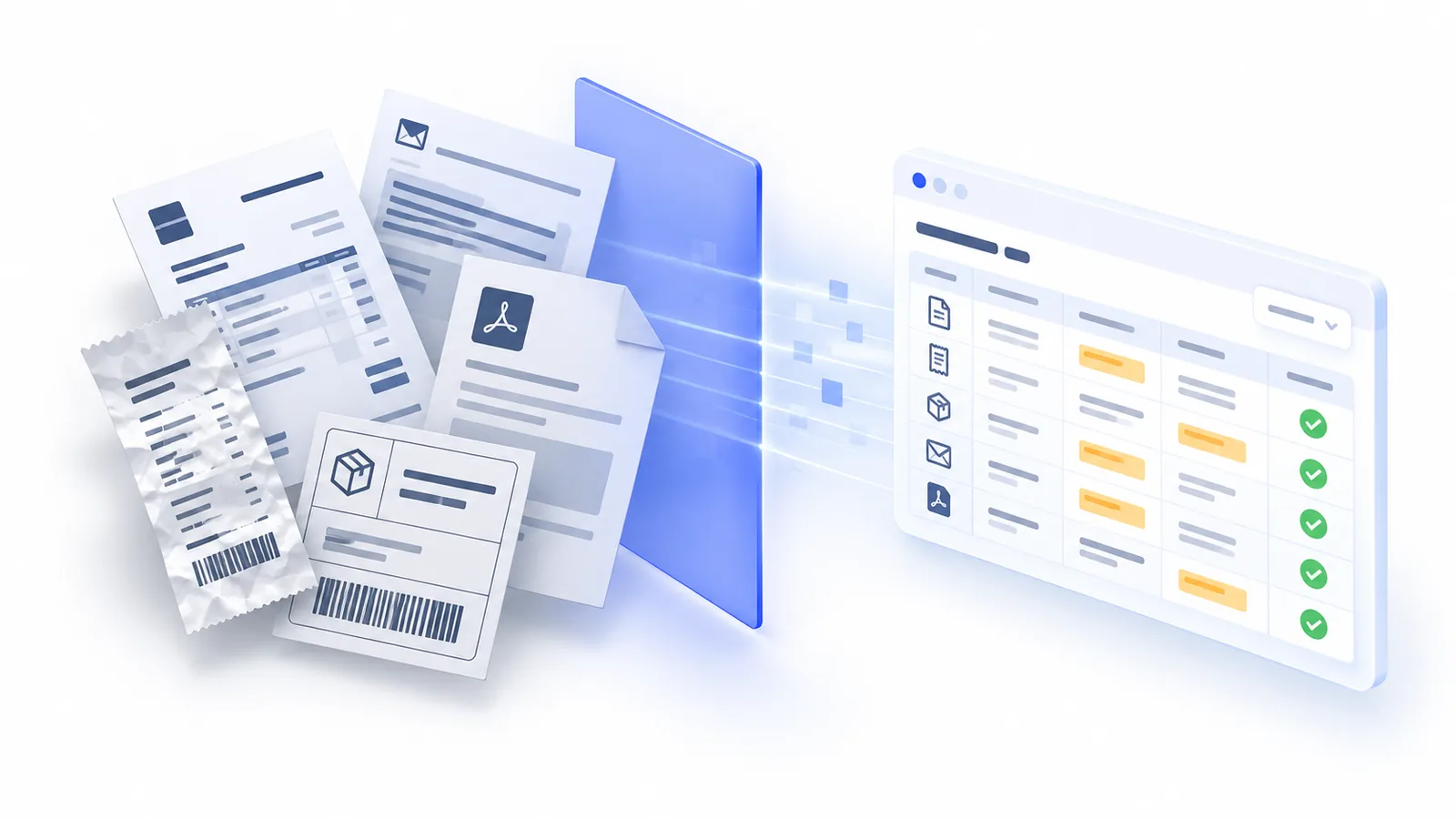
Stacks of invoices, receipts and shipping labels passing through a scan plane and becoming a clean spreadsheet
How it works

From inbox to spreadsheet in three steps

Forward it, drop it, or push it through the API. Docsift reads every page and delivers structured rows wherever you work.

Email forwardyou@acme.docsift.email UploadPDF, JPG, PNG, TIFF, DOCX REST APIPOST /v1/documents Cloud foldersDrive · Dropbox · OneDrive Docsift 1 · OCR every page 2 · AI finds fields 3 · Validate & clean ~4 s per page Google Sheetsnew row per document WebhookJSON to your endpoint Zapier · Make · n8n6,000+ apps ExportCSV · Excel · JSON IN Email forward · Upload REST API · Cloud folders PDF, scans, photos, emails Docsift 1 · OCR every page 2 · AI finds fields 3 · Validate & clean OUT Google Sheets · Webhook Zapier · Make · n8n CSV · Excel · JSON export
01

Send documents from anywhere

Forward emails to your private Docsift inbox, drag files into the app, or push them through the API, Zapier or a watched folder.

02

AI reads them — clean or blurry

Name the fields you want in plain English. Docsift finds them on any layout, including scans, phone photos and multi-page tables.

03

Structured data lands where you work

Every document becomes a consistent row. Download CSV or Excel, or stream it live to Sheets, webhooks and 6,000+ apps.

Start parsing free 30 pages included every month. No credit card.
Live demo

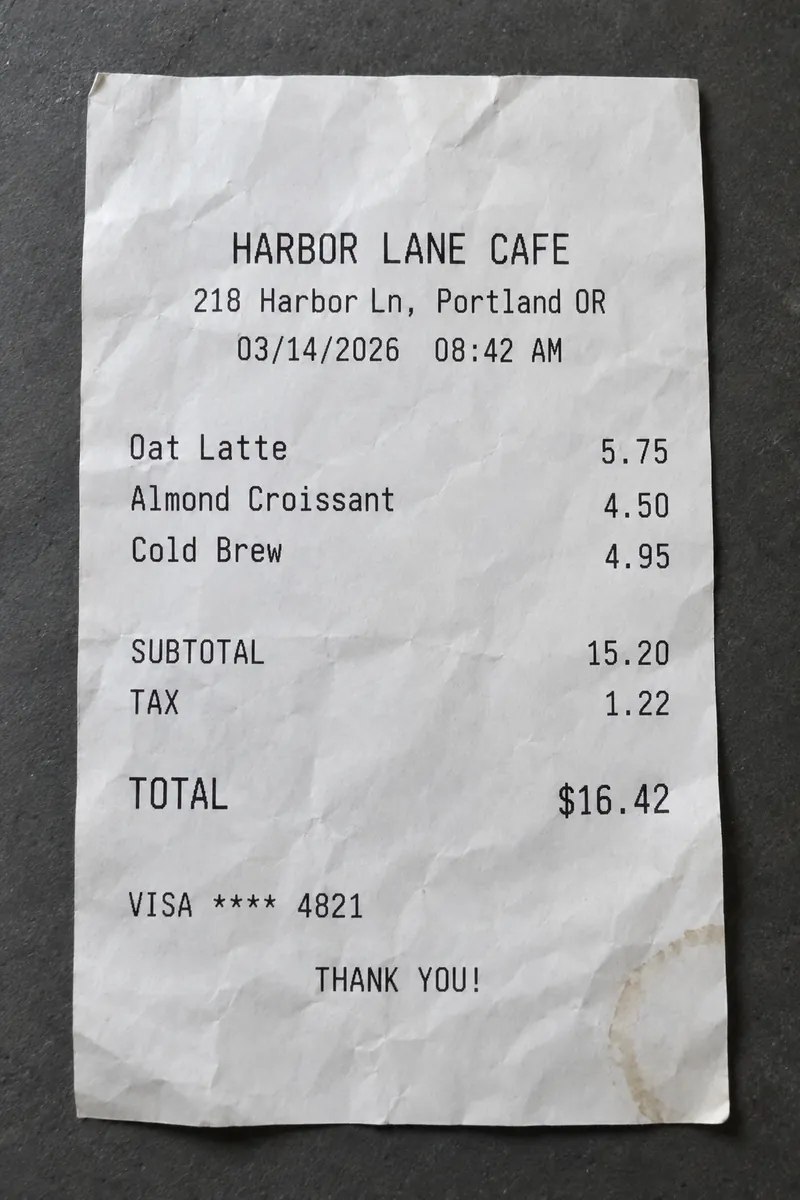
Watch Docsift read a crumpled receipt

Phone photos, PDFs and plain emails go through the same AI engine. Pick a document.

Photo of a crumpled Harbor Lane Cafe receipt totalling $16.42
INVOICE
Northwind Traders
42 Pier Rd, Alexandria VA
#1224-5817
Issued Mar 14, 2026
Due Apr 13, 2026
PO-33441
Bill to: Francis Drake · 2630 Hegal Pl
SKUDescriptionQtyAmount
BV-034Ball valve 3/4"1$99.00
TF-034Thru-hull fitting 3/4"2$49.00
Subtotal$148.00Tax$15.00Total due$163.00
From: Dana Whitfield <dana@brightlane.co>To: leads@acme.docsift.emailSubject: Quote request — office move in April

Hi there,

We're moving Brightlane Studio (14 people) to a new office on April 2nd and need a quote for packing and moving. Budget is around $4,500.

It's fairly urgent — can someone call me at +1 503 555 0142?

Thanks,
Dana

Extracted fields

        
receipt.jpg✓ Sent to Google Sheets✓ Webhook 200

Illustrative demo. Confidence scores shown per field; low-confidence values are flagged for review instead of exported.

Features

Everything you need to stop typing data by hand

One AI engine for every document type, with the controls ops and finance teams actually need.

No templates. Just describe the field.

Type what you want in plain English. Docsift finds it on every layout, even ones it has never seen.

due_date"When the invoice must be paid, as YYYY-MM-DD"
po_number"Purchase order, usually starts with PO"
line_items"Every product row: sku, qty, unit price"

A private inbox for every workflow

Forward emails or set an auto-forward rule. Docsift parses the body and every attachment.

invoice_4021.pdfNorthwind Traders · via email
Processed
receipt_0788.jpgSunrise Cafe · via upload
Processed
PO-33902.pdfRivera Logistics · via API
Parsing…

OCR for scans & handwriting

Skewed phone photos, faxes, stamps and handwritten notes — read in 100+ languages.

EnglishEspañolDeutschFrançais日本語中文العربية+95

Tables & line items

Multi-page tables become one row per line, with totals checked against the sum.

itemqtyamount
Ball valve 3/4"199.00
Thru-hull 3/4"249.00

Validation & clean-up

Normalize dates, currencies and names. Flag anything that looks off before it's exported.

date → ISO 8601
total = subtotal + tax ✓
confidence < 0.9 → review

Developer-friendly API & webhooks

Send a file, get JSON back. Signed webhooks, idempotency keys and a JSON schema per parser.

curl https://api.docsift.com/v1/documents \ -H "Authorization: Bearer $DOCSIFT_KEY" \ -F parser=invoices -F file=@INV-1224.pdf { "status": "processed", "total": 163.00, "vendor": "Northwind Traders" }

Review queue for your team

Low-confidence fields land in a shared queue. Fix once, and Docsift learns the pattern.

Use cases

Built for the documents your team drowns in

Accounts payable on autopilot

Forward supplier invoices and get vendor, dates, totals and every line item into your ledger or ERP — no retyping.

  • Auto-forward from your AP inbox
  • Line items with SKU, qty and unit price
  • Push to QuickBooks, Xero or a sheet
vendor_nameinvoice_numberissue_datedue_datepo_numbercurrencysubtotaltaxtotalline_items[]ibanpayment_terms

Expense receipts from any phone

Staff snap a photo, Docsift reads merchant, date, tax and total — even crumpled thermal paper.

  • Photos, screenshots and PDFs
  • Tax and tip split out automatically
  • Export straight to your expense sheet
merchantdatetimecategorysubtotaltaxtiptotalcard_last4currency

Sales orders & purchase orders

Turn customer POs and order emails into clean order lines for your OMS or ERP within seconds of arrival.

  • Any customer format, no mapping
  • Ship-to and bill-to split out
  • Webhook into your order system
customerpo_numberorder_dateship_tobill_torequested_dateline_items[]incotermstotal

Bills of lading, delivery notes, rate cons

Pull shipment, carrier and stop details from the PDFs and scans your dispatch team handles all day.

  • Multi-stop loads as rows
  • Handwritten signatures & stamps
  • Straight into your TMS or sheet
load_numbercarrierpickup_datepickup_addressdelivery_addressweightpiecesratereference

Leads & enquiries from email

Web forms, marketplace leads and quote requests land in your CRM as clean contacts — within seconds.

  • Parse the email body, not just attachments
  • Classify intent and priority
  • Push to HubSpot, Salesforce or Pipedrive
nameemailphonecompanyservicebudgetdate_neededprioritymessage_summary

Bank & card statements

Every transaction from multi-page statements as rows, ready for reconciliation.

  • Dozens of pages in one go
  • Balances checked for continuity
  • CSV or Excel ready for your ledger
account_holderaccount_last4period_startperiod_endopening_balanceclosing_balancetransactions[]
Why Docsift

Six minutes of retyping, or six seconds

Same invoice, two workflows.

MANUAL · ~6 MIN / DOC Open inbox Download PDF Read & find Retype 20 fields Double-check Paste into sheet DOCSIFT · ~6 SEC / DOC Email arrives Docsift parses Row in your sheet ✓ MANUAL · ~6 MIN Open inbox Download PDF Read & find fields Retype 20 fields Double-check Paste into sheet DOCSIFT · ~6 SEC Email arrives Docsift parses Row in your sheet ✓
DocsiftTemplate parsersDIY OCR + scriptsManual entry
Setup per document type~5 min, plain EnglishDraw zones & rulesWeeks of dev
New supplier layout Works immediately New template Code change
Scans, photos, handwriting~ Clean PDFs only~ Depends
Email body + attachments~
Line items & tables~~ Slow
MaintenanceNoneOngoingOngoing + on-callEvery day
Cost per 1,000 pagesfrom $18from $25$2–3 + engineer time~100 staff hours

Encrypted end to end

TLS 1.2+ in transit, AES-256 at rest. API keys hashed, never stored in plaintext.

Never used for training

Your documents are processed for your account only — never sold, shared or used to train models.

Retention you control

Auto-delete files after 1 to 365 days, or immediately after export.

US or EU data residency

Pick where documents are stored and processed. GDPR-ready DPA on request.

Roles & SSO

Invite your team with admin, editor and reviewer roles. SAML SSO on Enterprise.

Audit log

Every document, edit and export is logged and traceable.

Pricing

Simple, volume-based pricing

Pay for pages, not seats or fields. 1 page = 1 credit. Unused credits roll over for a month.

305003.5k25k100k+
BEST FIT

Free

Try it on real documents. Forever free.

$0/ month
No card needed
30 pages / month
  • AI + OCR engine
  • Unlimited inboxes & fields
  • CSV, Excel, JSON export
  • Zapier, Make, Sheets
  • Webhooks & API
Start free
BEST FIT

Starter

For one team replacing manual entry.

$29/ month
 
100 pages / month
  • Everything in Free
  • Webhooks & REST API
  • Validation & clean-up rules
  • 3 team members
  • 1-year retention
Start 14-day trial
BEST FIT

Growth

For ops & finance teams at volume.

$149/ month
 
2,000 pages / month
  • Everything in Starter
  • Review queue & approvals
  • Custom post-processing
  • 10 team members
  • Priority support
Start 14-day trial
BEST FIT

Scale

Lowest cost per page for heavy volume.

$399/ month
 
10,000 pages / month
  • Everything in Growth
  • Unlimited team members
  • EU or US data residency
  • Unlimited retention
  • Dedicated onboarding
Start 14-day trial
BEST FIT

Enterprise

100k+ pages, SAML SSO, custom DPA, SLA and a dedicated success engineer.

Talk to us
1 page = 1 credit Cancel anytime No per-field or per-seat fees Prices in USD, excl. tax
Compare all features
FreeStarterGrowthScale
Pages / month30100 – 1,0002,000 – 5,00010,000 – 100,000
Inboxes & extracted fieldsUnlimitedUnlimitedUnlimitedUnlimited
AI + OCR engine
Webhooks & REST API
Review queue
Custom post-processing
Team members1310Unlimited
Document retention30 days1 year1 yearUnlimited
Data residencyUSUSUSUS or EU
SupportDocs & chatEmailPriorityDedicated
“We used to lose Monday mornings to supplier invoices. Now they're in QuickBooks before anyone logs in.”
Example quote · Head of Finance, distribution company
★★★★★
“Setup took one coffee. I described six fields and it just worked on 40 different supplier layouts.”
MR
Ops managerWholesale
Example
★★★★★
“The crumpled-receipt thing is real. Our field techs just snap photos and the totals land in our expense sheet.”
JT
ControllerField services
Example
★★★★★
“We replaced a template parser we had to fix every week. Zero maintenance since.”
AL
RevOps leadSaaS
Example
★★★★★
“Rate confirmations used to take my dispatchers 10 minutes each. Now it's a webhook into our TMS.”
KB
FounderFreight brokerage
Example
★★★★★
“The JSON schema per parser means our devs didn't write a single regex.”
SP
Engineering leadProptech
Example
★★★★★
“Leads from three marketplaces now show up in HubSpot as clean contacts in seconds.”
DN
Marketing opsHome services
Example
FAQ

Questions, answered

Can't find it here? Email hello@docsift.com and a human replies within a day.

What counts as a page?
One page of a PDF or image, or one email body, uses one credit. A 3-page invoice uses 3 credits. Attachments on an email are counted by their pages.
Do I need to build templates?
No. You list the fields you want and describe them in plain English. Docsift's AI finds them on any layout — including ones it has never seen before.
Can it read scans, phone photos and handwriting?
Yes. Every page goes through OCR first, so skewed scans, faxes, photos and clear handwriting all work. Very low-quality images are flagged for review rather than guessed.
How do documents get into Docsift?
Forward emails to your private Docsift address, upload in the app, send them via the REST API, or connect Zapier, Make, n8n, Google Drive, Dropbox or OneDrive.
Where can I send the extracted data?
Download CSV, Excel or JSON, sync to Google Sheets, push to any URL with webhooks, or connect to 6,000+ apps through Zapier, Make, n8n and Power Automate.
What happens when a supplier changes their layout?
Nothing — there's no template to break. Docsift reads each document fresh, so new layouts, vendors and formats work the moment they arrive.
Do I need a developer?
No. Inboxes, fields, exports and integrations are all point-and-click. The API and webhooks are there when your developers want them.
How accurate is it?
On typed documents most fields come back correct first time. Every value has a confidence score; anything below your threshold goes to a review queue instead of your systems.
Is my data secure? Do you train on it?
Documents are encrypted in transit and at rest, retention is up to you, and your data is never used to train AI models or shared with anyone.
What if I go over my monthly pages?
Nothing breaks. We'll email you at 80% and 100%, and you can upgrade in one click. Documents over the limit wait in a queue until you do.
Do I need a credit card? Can I cancel anytime?
No card is needed for the Free plan or the 14-day trial. Paid plans are month-to-month or yearly with no lock-in — upgrade, downgrade or cancel in one click.

Your next 30 documents are on us.

Create a free account, forward one email, and watch the data land in your sheet. No credit card, no templates.